
-
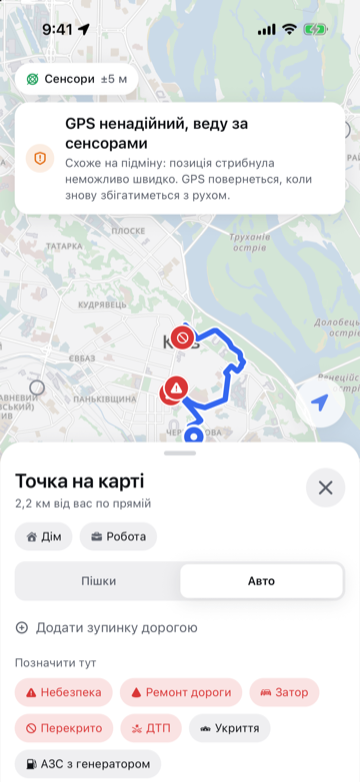
Sees spoofing
Position jumps, heading or speed disagree with the sensors — Kurs switches to network or sensors and says so out loud. It returns to GPS only once GPS matches your movement again.
-
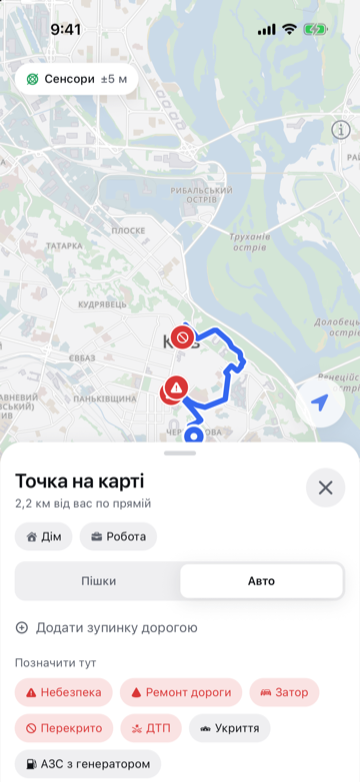
Guides without GPS
On foot — gyroscope and steps; in a car — gyroscope and OBD2 speed. Your position snaps to roads, and the error is visible on the map.
-
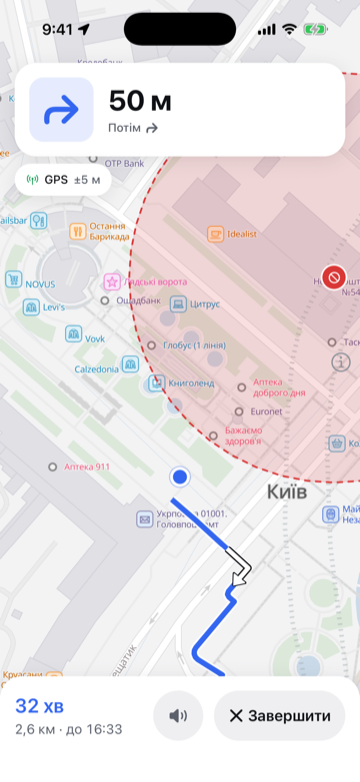
Turn-by-turn in Ukrainian
Voice prompts, a maneuver card, lanes and speed limits from road signs. Kurs offers a faster route on the go and estimates arrival from your real pace.
-
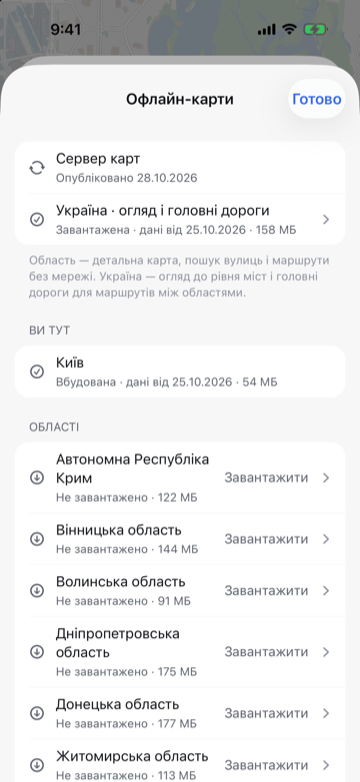
All of Ukraine offline
27 regions: 24 oblasts, Crimea, Kyiv and Sevastopol. Detailed map, address and place search, routing — no internet needed. Kyiv ships with the app; other regions are 90 to 180 MB each.
-
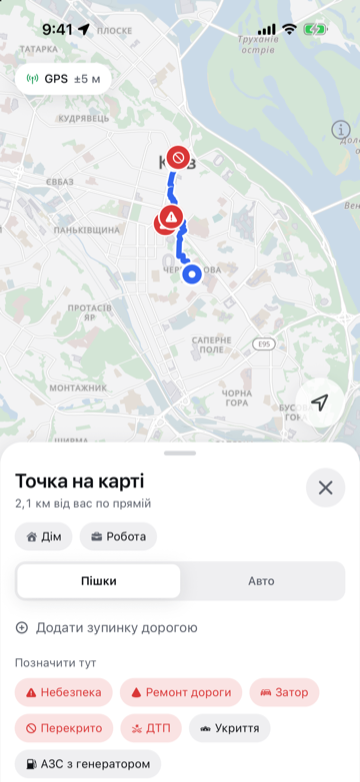
Shared road marks
Danger, roadworks, traffic jam, closed road, accident, shelter, fuel station with a generator. No accounts: a mark lives from 2 hours to 14 days, “still here” extends it, three “gone” remove it. No checkpoints, on purpose.
-
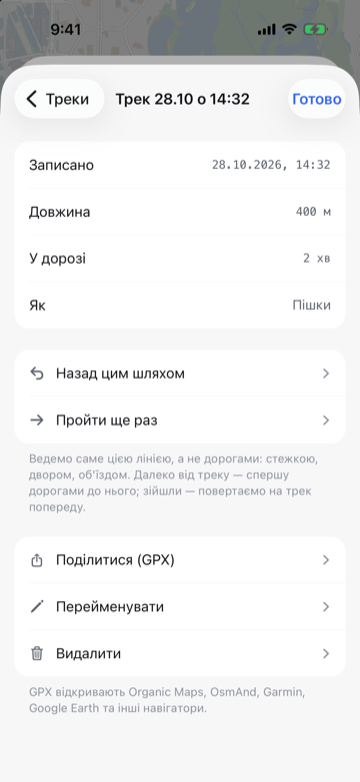
Tracks and “back the same way”
Record your path — even with the screen locked — and follow it back or walk it again. GPX tracks open straight from Telegram, Viber, Mail or AirDrop.
Offline navigation for iPhone
Keeps you on route when GPS lies
Kurs notices when GPS is jammed or spoofed and keeps guiding you with your phone's own sensors — on an offline map of all Ukraine.
Coming soon to the App Store and Google Play
- No sign-up
- All of Ukraine offline
- Voice guidance in Ukrainian
The problem
When GPS lies, an ordinary navigator believes it
When satellite signals are jammed or spoofed, the phone gets a false position. A navigator that relies on GPS alone follows it.
-
Your position jumps to another city
You are on your own street, yet the map puts you hundreds of kilometres away. That is spoofing: the phone accepted a fake signal.
-
It freezes mid-road
You keep driving, the position stays put. The signal is jammed, and the navigator waits for it to come back.
-
A turn that isn't there
The navigator says turn right — and there is a wall on the right. The route is calculated from a place you are not.
When Kurs helps
-
Driving through an electronic warfare zone
GPS suddenly puts you dozens of kilometres away. Kurs spots the jump, takes speed from OBD2 and heading from the gyroscope, and guides you to the next turn.
-
Walking a city under jamming
No satellites, the dot is frozen. Kurs counts steps and turns, keeps you on the street and gets you where you need to be — home or a meeting.
-
A highway between regions with no signal
No mobile internet for hours. Regional maps and main roads are already on the phone: routing, search and voice work offline.
How it works
It checks GPS. When GPS lies, it guides by sensors
Kurs doesn't trust GPS blindly: every position is checked against what the phone itself senses.
-
Listens to satellites
While GPS is honest, Kurs follows it like any navigator.
-
Spots the fake
A jump faster than 60 m/s, a heading that disagrees with the gyroscope, a speed that disagrees with the speedometer, a suddenly “perfect” accuracy. Any of these puts GPS under suspicion.
-
Keeps going without GPS
The gyroscope tracks turns, steps or OBD2 measure distance, and the road graph keeps you on the street. A voice tells you: “GPS spoofed, guiding by sensors”.
Features
Built for roads where the signal vanishes without warning
Six reasons to install Kurs before you need it.
In the car
Speed from the speedometer, the next turn on your lock screen
In a car Kurs takes speed straight from the vehicle, so distance without GPS is measured, not guessed.
OBD2 adapter
An ELM327 adapter (Bluetooth or Wi-Fi) in the OBD2 port passes the speedometer reading. Kurs reads speed and nothing else.
Live Activity
Next maneuver, distance and arrival time on the Lock Screen and in the Dynamic Island — including when Kurs is guiding by sensors.
Apple Watch
Turn arrow, distance, street and arrival time on your wrist.
CarPlay
Map, route and position on the car's display.
Night theme
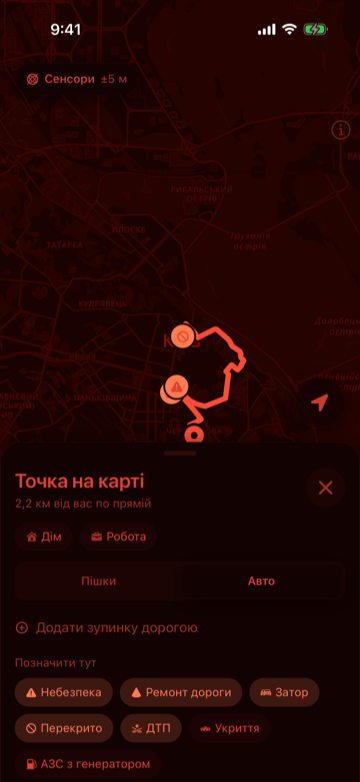
Red on black at minimum brightness: it won't dazzle you in the dark or glow from afar. Auto theme switches to dark at sunset.
OBD2 is optional: without an adapter Kurs estimates speed from the road and recent data.
Offline map
All of Ukraine, on your phone
Download the regions you need once — map, search and routing then work with no connection. Main roads from the national overview connect the regions.
- regions: 24 oblasts, Crimea, Kyiv, Sevastopol
- 27
- built into the app
- Kyiv
- needed to download a map
- 0 accounts
Offline mode turns off mark sharing and map downloads — Kurs works only with what is already on the phone.
Privacy
Only your phone knows your route
Position, routes and tracks are computed and stored on the device. No accounts, ads or analytics.
No accounts
No sign-up, no email, no phone number.
No ads, no trackers
The app has no analytics, advertising or tracking SDKs.
Everything on device
Route, guidance, voice, tracks, home and work never leave the phone.
Offline mode
One switch turns off marks and map downloads.
Only shared marks reach our server: the marks you place, and a request for marks around you (a map area the server does not store). You can turn this off in the app: «Налаштування» → «Позначки» → «Лише на телефоні» (Only on this phone).
Privacy PolicyFAQ
Frequently asked questions
Does Kurs work without internet?
Yes. The map, address search, routing, voice and guidance all work offline. You need internet only to download regions and to share road marks.
How accurate is Kurs without GPS?
Accuracy without GPS decreases over time: the error grows with every metre travelled. Kurs shows it as a circle around your position, keeps the position on the road and re-aligns it at turns. As soon as GPS matches your movement again, Kurs switches back. It is most accurate in a car with an OBD2 adapter.
Do I need an OBD2 adapter?
No. On foot Kurs counts steps. In a car without an adapter it estimates speed from the road and recent data, so the distance error is larger. An ELM327 adapter with Bluetooth or Wi-Fi gives the exact speedometer reading.
Do you collect my location?
No. Your position and routes stay on the phone. If shared marks are on, Kurs sends the marks you place to our server and asks for marks in the area around you — the server does not store that area. Details are in the Privacy Policy.
What is GPS spoofing?
A fake satellite signal that is stronger than the real one. The phone accepts it and shows whatever position the transmitter dictates — in another city or in the middle of a field. Jamming is when the signal is drowned in noise and there is no position at all.
Which iPhones are supported?
Any iPhone running iOS 18 or later. iPad is not supported yet.
Is the app available in English?
Not yet: the interface and voice guidance are in Ukrainian. This site and support are available in English.
Is Kurs available for Android?
The Android version is coming to Google Play soon. On Android Kurs also analyses satellite signals: jamming and spoofing show up in signal strength.
How much does Kurs cost?
Kurs is free. No ads, no sign-up.

Install Kurs before the signal disappears
Get the app and your regions' maps in advance — then the navigator is ready when GPS starts lying.
Coming soon to the App Store and Google Play
Kurs is coming to the App Store very soon.
Free, no ads